ClipSketch AI: Transform Video Moments into Hand-Drawn Stories with AI
Introduction
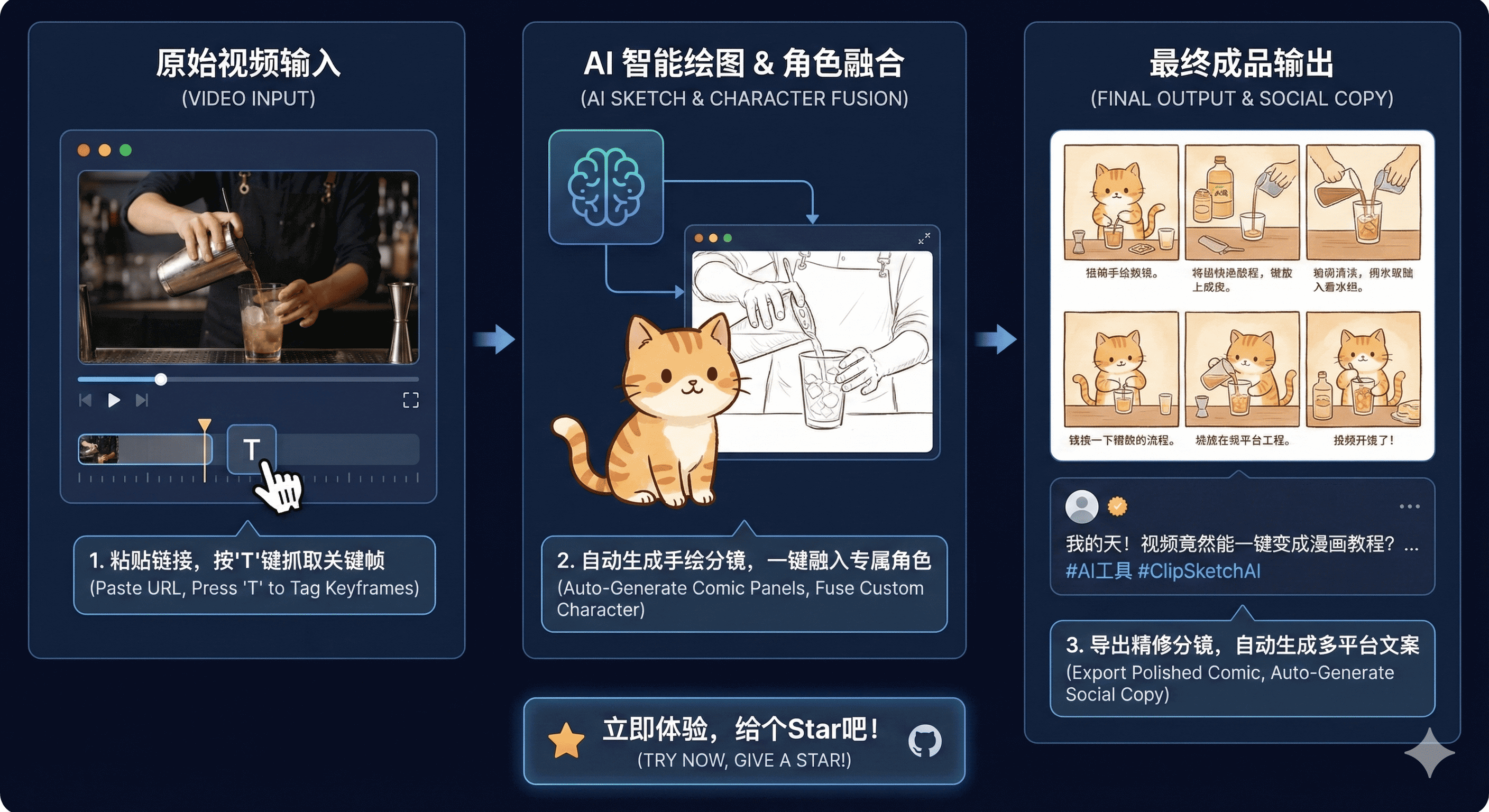
In the age of short-form video content, creators face a constant challenge: how to efficiently repurpose compelling video moments into engaging social media content. Enter ClipSketch AI, an innovative open-source tool that's revolutionizing the content creation workflow by leveraging Google's Gemini multimodal AI to automatically convert video clips into beautiful hand-drawn storyboards.
Developed by RanFeng and hosted on GitHub with over 1,000 stars, ClipSketch AI is more than just a video player—it's a complete AI-powered content creation workstation designed specifically for video creators, social media managers, and content remixers.
What Makes ClipSketch AI Different?
Unlike traditional video editing tools that focus on trimming and effects, ClipSketch AI takes a fundamentally different approach. It transforms the way creators interact with video content by enabling frame-level precision marking and then using advanced AI to reimagine those moments as artistic hand-drawn illustrations.
The magic happens through the integration of Google's Gemini Pro models, which analyze marked video frames and generate cohesive, cute hand-drawn style storyboards that feel like they came straight from an illustrator's sketchbook. But it doesn't stop there—the tool also automatically generates viral-worthy social media copy in multiple styles, making it a complete solution for content repurposing.
Core Features Breakdown
1. Powerful Video Acquisition
ClipSketch AI supports direct importing from popular Chinese social platforms including Bilibili and Xiaohongshu (Little Red Book). The system can parse both standard and short sharing links, even when they're mixed with promotional text. Once imported, videos play in high definition with adaptive layouts optimized for both vertical (9:16) and widescreen formats.
The video player includes intelligent keyboard shortcuts: spacebar for play/pause, left/right arrows for frame-by-frame navigation with smart step adjustments, making it easy to find exactly the right moment to capture.
2. Frame-Level Marking System
Precision is everything when capturing the perfect moment. ClipSketch AI offers millisecond-level accuracy for marking frames. Users can quickly tag highlights by pressing the T key or clicking the Tag button during playback.
All marked frames are organized in a timeline list that can be exported in multiple formats:
- TXT format: A timeline file with precise timestamps
- ZIP package: All marked frames as individual image files
This flexibility makes it easy to integrate ClipSketch AI into existing workflows or use the marked content in other tools.
3. AI Art Studio (Powered by Gemini)
This is where ClipSketch AI truly shines. The AI Art Studio leverages Google's Gemini models to transform raw video frames into polished creative content:
Smart Drawing Generation: Using the gemini-3-pro-image-preview model, the tool analyzes multiple marked frames and synthesizes them into a single, coherent hand-drawn style storyboard. The AI maintains visual consistency while adding artistic flair that makes content feel fresh and engaging.
Social Media Copywriting: The gemini-3-pro-preview model automatically generates copy in three distinct styles:
- Emotional storytelling: Narrative-driven content that connects with audiences emotionally
- Educational how-to: Informative content that teaches or explains
- Short and punchy: Concise, attention-grabbing micro-content
Character Integration: Users can upload custom characters or avatars, and the AI automatically blends them into the storyboard scenes, maintaining style consistency throughout.
Cover Generation: Based on selected copy and original frames, the system generates high-quality vertical video covers optimized for social media platforms.
Batch Refinement: For creators working at scale, ClipSketch AI supports batch generation and optimization of storyboard panels, with optional configuration to use Google's Batch API for cost savings.
4. Cross-Platform Adaptation
ClipSketch AI features responsive design that works seamlessly across devices:
- Desktop: Full widescreen layout with comprehensive controls
- Tablet: Optimized for iPad with touch-friendly interfaces
- Mobile: Automatic switch to vertical layout (top-bottom) for one-handed operation
Technical Architecture
ClipSketch AI is built on a modern web stack optimized for performance and developer experience:
Frontend Framework: React 19 with TypeScript for type-safe component development
Styling: Tailwind CSS provides utility-first styling with responsive breakpoints
Icons: Lucide React for consistent, lightweight iconography
AI Integration: Google GenAI SDK (@google/genai) handles all AI model interactions
Utilities:
- JSZip for packaging downloads
- Canvas API for video frame extraction
- IndexedDB for persistent local state management
The application is built using Vite, ensuring fast development iterations and optimized production builds.
Getting Started
Setting up ClipSketch AI is straightforward for developers familiar with Node.js:
Prerequisites
- Node.js v18 or higher
- A Google Gemini API key (obtain from Google AI Studio)
Installation Steps
- Clone the repository:
git clone https://github.com/RanFeng/clipsketch-ai.git
cd clipsketch-ai
- Install dependencies:
npm install
- Configure environment variables by creating a
.env.localfile:
GEMINI_API_KEY=your_api_key_here
- Start the development server:
npm run dev
- Open your browser to
http://localhost:3000
Workflow Guide
Using ClipSketch AI follows an intuitive process:
- Import: Copy a share link from Bilibili or Xiaohongshu and paste it into the input field. The system automatically extracts and loads the video.
- Mark: Watch the video and press
Twhenever you spot a moment worth capturing. The spacebar controls playback, while arrow keys provide precise frame-by-frame control. - Create: Click "Next: AI Drawing" to enter the AI Studio. If you haven't configured an environment variable, you can paste your Gemini API key in the interface.
- Generate: The AI analyzes your marked frames, generates hand-drawn storyboards, optionally integrates custom characters, refines individual panels, and creates matching social media copy with cover images.
- Export: Download your generated storyboard images, cover art, or package everything together. Copy your preferred caption with a single click.
Real-World Use Cases
ClipSketch AI shines in several practical scenarios:
Product Review Remixing: Extract highlights from product review videos on Bilibili and repurpose them as hand-drawn illustrated posts for Xiaohongshu or Instagram.
Tutorial Breakdown: Take educational long-form content and distill it into digestible, illustrated step-by-step guides perfect for social media.
Brand Content Adaptation: Transform existing video assets into fresh, illustrated content that stands out in crowded social media feeds.
Community Management: Quickly create engaging visual content from user-generated videos or trending clips for community channels.
Important Considerations
API Access: The AI drawing features require that your Gemini API key has access to the gemini-3-pro-image-preview model. If you encounter 403 errors, check your Google Cloud project permissions.
Cross-Origin Playback: To support external video link playback and frame extraction, ClipSketch AI uses specific proxy strategies and sets referrerPolicy="no-referrer".
Cost Management: While Gemini API usage is relatively affordable, batch operations can accumulate costs. The tool supports configuring batch API mode to optimize expenses for high-volume users.
The Open Source Advantage
ClipSketch AI is released under the MIT License, making it free to use, modify, and distribute. The project's open-source nature offers several benefits:
- Transparency: Review the code to understand exactly how your data is processed
- Customization: Modify the tool to fit your specific workflow needs
- Community: Contribute improvements or adapt the tool for different platforms
- Cost Control: Self-host to avoid third-party service fees
With 119 forks on GitHub, the community is already actively building upon and adapting the project for various use cases.
Performance and Scalability
The application's architecture supports efficient content generation at scale. By leveraging IndexedDB for local state management, ClipSketch AI can handle large marking sessions without performance degradation. The optional batch API configuration allows creators to process multiple storyboards efficiently while managing API costs.
Future Possibilities
While ClipSketch AI already offers impressive functionality, the open-source nature and active community suggest exciting future developments:
- Additional Platform Support: Integration with more video platforms beyond Bilibili and Xiaohongshu
- Style Customization: User-defined illustration styles or AI model selection
- Collaborative Features: Team workflows and shared projects
- Advanced Export Options: Direct publishing to social media platforms
- Model Alternatives: Support for other AI providers beyond Google Gemini
Conclusion
ClipSketch AI represents a new paradigm in content creation tools—one that combines the precision of manual curation with the creative power of generative AI. By automating the time-consuming process of extracting video moments and transforming them into illustrated social media content, it democratizes high-quality content creation.
For video creators drowning in footage, social media managers seeking to maximize content ROI, or anyone interested in the intersection of AI and creative tools, ClipSketch AI offers a compelling solution. Its open-source nature ensures that it will continue to evolve with community input while remaining accessible to creators of all levels.
The tool's success—evidenced by its 1,000+ GitHub stars and active community—demonstrates the appetite for AI-powered creative tools that enhance rather than replace human creativity. As multimodal AI models continue to improve, tools like ClipSketch AI will only become more powerful and versatile.
Ready to transform your video content workflow? Check out the ClipSketch AI repository on GitHub or try the live demo to see it in action.
About the Project
- Repository: github.com/RanFeng/clipsketch-ai
- Live Demo: clipsketch-ai.vercel.app
- License: MIT
- Developer: RanFeng
- Community: 1k+ stars, 119 forks
Disclosure: This blog post was written to inform readers about an open-source project. No commercial relationship exists between the author and the project maintainers.